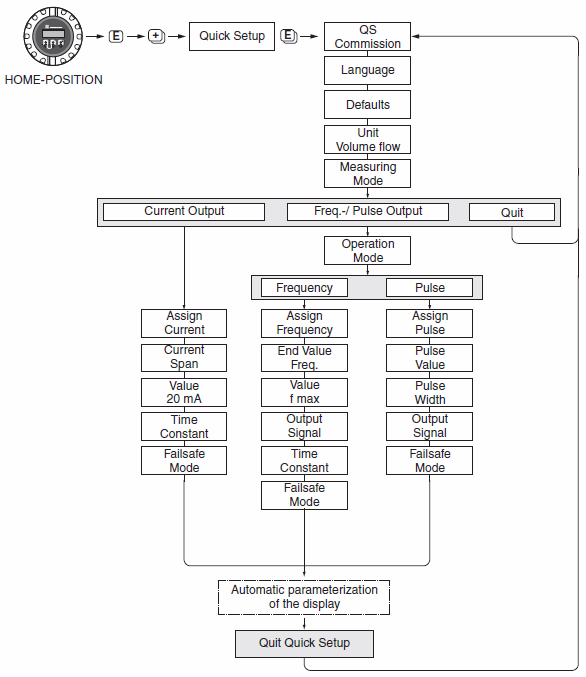
1. After the instrument is powered on and stabilized, press "E" key to enter the menu group, and "Group Select" will appear"
Measuring Values
2. Press "+" or "-" to find "Unit Volume Flow". Use "+/-" key and "E" key to confirm the volume flow unit,
Enter 10, and finally press "E" key to confirm;
3. Display "Unit Volume Flow", use "+/-" key and "E" key to confirm the mass flow unit;
“m³/h”
4. "Unit Totalizer", you can use "+/-" key and "E" key to confirm the cumulative value unit;
“M³ ;"
5. Press "+" and "-" to return at the same time, then press "+" or "-" to find "Current Output" and press "E" to select and output "4-20mA Hart Namur", then press "E" and use "+ and-" to enter the value corresponding to 20mA,
Press "E" to confirm;
6. Press "E" to "Failsafe Mode", press "+" or "-", select "Max current value", and output when alarming
Maximum current value;
7. Press "+" "-" at the same time to return to "Current Output 1", and then press "+" or "-" to find
"ProcessParameter", press "E" to set "On-value low flow cut off" to the small flow cut off value,
The general setting range is 1% to 5% of the corresponding value of 20mA;